Person recognition
using Eigenfaces
A Project by Captain Mich
This is an App made for a University project that computes eigenfaces and recognize a person in a given database set
Project Division
Below we are going to divide the project in sections; we also assume that the database is just a folder with color pics inside
- 1. Main Activity
- 2. Create Database Class
- 3. Create Image Class
- 4. Create Eigenfaces Class and Task
- 5. Create Facial Recognition Class and Task
- 6. Create Camera Task to Take a Picture
Main Activity
To start, let's go to create a simple graphical interface for our app. It will be made by:
- A button to create the database
- A button to compute the eigenfaces
- A button to take a picture with the database set
- A button to compare the taken picture with the database set
<?xml version="1.0" encoding="utf-8"?>
<RelativeLayout xmlns:android="http://schemas.android.com/apk/res/android"
    xmlns:app="http://schemas.android.com/apk/res-auto"
    xmlns:tools="http://schemas.android.com/tools"
    android:layout_width="match_parent"
    android:layout_height="match_parent"
    tools:context=".MainActivity">

    <Button
        android:id="@+id/btn_check"
        android:layout_width="352dp"
        android:layout_height="wrap_content"
        android:layout_alignParentBottom="true"
        android:layout_centerHorizontal="true"
        android:layout_marginBottom="16dp"
        android:text="Check"
        tools:layout_editor_absoluteX="148dp"
        tools:layout_editor_absoluteY="409dp" />

    <Button
        android:id="@+id/btn_training"
        android:layout_width="175dp"
        android:layout_height="wrap_content"
        android:layout_alignEnd="@+id/btn_check"
        android:layout_alignParentBottom="true"
        android:layout_marginBottom="129dp"
        android:text="Training"
        tools:layout_editor_absoluteX="148dp"
        tools:layout_editor_absoluteY="409dp" />

    <Button
        android:id="@+id/btn_take_picture"
        android:layout_width="352dp"
        android:layout_height="wrap_content"
        android:layout_alignParentBottom="true"
        android:layout_centerHorizontal="true"
        android:layout_marginBottom="71dp"
        android:text="Take Picture"
        tools:layout_editor_absoluteX="148dp"
        tools:layout_editor_absoluteY="409dp" />

    <Button
        android:id="@+id/btn_load_db"
        android:layout_width="175dp"
        android:layout_height="wrap_content"
        android:layout_alignStart="@+id/btn_check"
        android:layout_alignTop="@+id/btn_training"
        android:text="Load DB"
        tools:layout_editor_absoluteX="148dp"
        tools:layout_editor_absoluteY="409dp" />

</RelativeLayout>
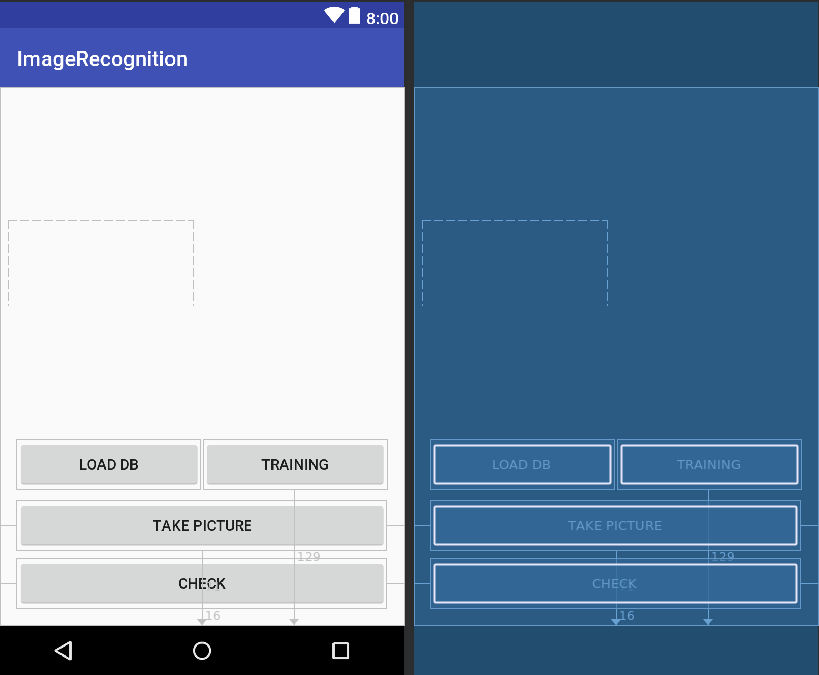
Then we need to link all the created buttons in the Main Activity of our app in order to be able to use them.Two methods are defined: one to initialize the elements of our interface, the other one to initialize the listeners of each button. Then, the two methods are called inside the onCreate.
public class MainActivity extends AppCompatActivity implements EigenfacesResultTask {

    private Button btn_Load_Db = null;
    private Button btn_Take_Picture = null;
    private Button btn_Check = null;
    private Button btn_Training = null;
    private Context context = null;

    public Database db = null;

    @Override
    protected void onCreate(Bundle savedInstanceState) {
        super.onCreate(savedInstanceState);
        setContentView(R.layout.activity_main);

        context = getApplicationContext();

        initViews();
        initListeners();

        ActivityCompat.requestPermissions(MainActivity.this, new String[]{Manifest.permission.WRITE_EXTERNAL_STORAGE}, 1);
    }

    /**
     * This method is to initialize views
     */
    private void initViews() {

        btn_Load_Db = (Button) findViewById(R.id.btn_load_db);
        btn_Take_Picture = (Button) findViewById(R.id.btn_take_picture);
        btn_Check = (Button) findViewById(R.id.btn_check);
        btn_Training = (Button) findViewById(R.id.btn_training);
    }

    /**
     * This method is to initialize listeners
     */
    private void initListeners() {

        btn_Load_Db.setOnClickListener(new View.OnClickListener() {
            @Override
            public void onClick(View view) {

            }
        });

        btn_Training.setOnClickListener(new View.OnClickListener() {
            @Override
            public void onClick(View view) {

            }
        });
        btn_Take_Picture.setOnClickListener(new View.OnClickListener() {
            @Override
            public void onClick(View view) {

            }
        });

        btn_Check.setOnClickListener(new View.OnClickListener() {
            @Override
            public void onClick(View view) {

            }
        });
    }
}
Database Class
For reasons of simplifications we are going to assume that the database is just a folder with a given set of color images of any dimension not bigger than 2 MB (simply for a speed time reason, especially on big databses). It's noticeable also that in a database there can be more than one face of a same person; each image should have the same light exposition and each face should be aligned. In our example we are going to take as database set 20 images made of 4 people in 5 different position.
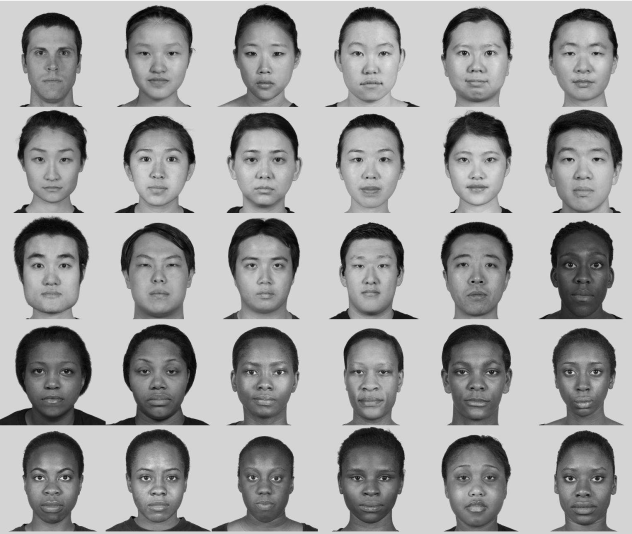
In order to go through the next phases of the project we need to resize the images: we have chosen 256 x 256 pixels as default dimension. We also need to turn them into grayscale to reduce the computational cost of the implementation and compress as '.png' filetype. Let's go into the code:
public class Database {

    private String DEFAULT_APP_IMAGEDATA_DIRECTORY;
    private String lastImagePath = "";

    /** Decodes the Bitmap from 'path' and returns it */
    public Bitmap getImage(String path) {
        Bitmap bitmapFromPath = null;
        try {
            bitmapFromPath = BitmapFactory.decodeFile(path);

        } catch (Exception e) {
            // TODO: handle exception
            e.printStackTrace();
        }

        return bitmapFromPath;
    }

    /** Returns the String path of the last saved image */
    public String getSavedImagePath() {
        return lastImagePath;
    }

    public boolean putImageWithFullPath(String fullPath, Bitmap theBitmap) {
        return !(fullPath == null || theBitmap == null) && saveBitmap(fullPath, theBitmap);
    }

    public String setupFullPath(String imageName, String path) {
        File mFolder = new File(Environment.getExternalStorageDirectory()+ path);

        if (isExternalStorageReadable() && isExternalStorageWritable() && !mFolder.exists()) {
            if (!mFolder.mkdirs()) {
                Log.e("ERROR", "Failed to setup folder");
                return "";
            }
        }

        return mFolder.getPath() + '/' + imageName;
    }

    /** Check if external storage is writable or not */
    public static boolean isExternalStorageWritable() {
        return Environment.MEDIA_MOUNTED.equals(Environment.getExternalStorageState());
    }

    /** Check if external storage is readable or not */
    public static boolean isExternalStorageReadable() {
        String state = Environment.getExternalStorageState();
        return Environment.MEDIA_MOUNTED.equals(state) || Environment.MEDIA_MOUNTED_READ_ONLY.equals(state);
    }

    /** Saves the Bitmap as a PNG file at path 'fullPath' */
    private boolean saveBitmap(String fullPath, Bitmap bitmap) {
        if (fullPath == null || bitmap == null)
            return false;

        boolean fileCreated = false;
        boolean bitmapCompressed = false;
        boolean streamClosed = false;

        File imageFile = new File(fullPath);

        if (imageFile.exists())
            if (!imageFile.delete())
                return false;

        try {
            fileCreated = imageFile.createNewFile();

        } catch (IOException e) {
            e.printStackTrace();
        }

        FileOutputStream out = null;
        try {
            out = new FileOutputStream(imageFile);
            bitmapCompressed = bitmap.compress(Bitmap.CompressFormat.PNG, 100, out);

        } catch (Exception e) {
            e.printStackTrace();
            bitmapCompressed = false;

        } finally {
            if (out != null) {
                try {
                    out.flush();
                    out.close();
                    streamClosed = true;

                } catch (IOException e) {
                    e.printStackTrace();
                    streamClosed = false;
                }
            }
        }

        return (fileCreated && bitmapCompressed && streamClosed);
    }

    public void createDatabase(){

        String folder_path = Environment.getExternalStorageDirectory()+"/APP/DB_colors/";
        String image_path = null;
        File directory = new File(folder_path);
        File[] files = directory.listFiles();

        //Log.d("Files", "Size: "+ files.length);

        if (files != null) {
            for (int i = 0; i < files.length; i++) {
                image_path = folder_path + files[i].getName().toString();
                Bitmap temp = getImage(image_path);
                Bitmap temp_bw = Image.createGrayScale(temp);
                Bitmap resized_temp = Image.resizeImage(temp_bw);
                putImageWithFullPath(setupFullPath(files[i].getName().toString().replace(".jpeg","") + "_bw.png", "/APP/DB_bw"), resized_temp);
            }
        }
    }

    public void createTrainingDatabase(Bitmap src, int numberOfImage){

        putImageWithFullPath(setupFullPath("image_" + String.valueOf(numberOfImage) + "_eigen.png", "/APP/DB_Training"), src);

    }
}
We created a public Database class made with some different methods, let's look at them in detail:
- getImage -> this method takes in input a file path and return ,if it is possible (see the try and catch block), the decoded file as a Bitmap
- getSaveImagedPath -> this method just gives us the path of the last saved image as a string
- isExternalStorageWritable -> this method is boolean, it check if external storage is writable or not
- isExternalStorageReadable -> this method is boolean, it check if external storage is readable or not
- setupFullPath -> this method is used to create our database grayscale folder; if the path is successfully created it is returned as a string.
- setupFullPathTraining -> this method is used to create our eigenfaces folder; if the path is successfully created it is returned as a string.
- saveBitmap -> this method is boolean, it save the Bitmap as a '.png' file at the given input path. It return true only if the file is created, the bitmap compression in '.png' is made and the stream is successfully closed.
- putImageWithFullPath -> this method take in input the path where you want to save the '.png' image and a Bitmap filetype; using the
saveBitmapmethod, it save the image in the chosen path
- createDatabase -> this method combine some other methods of the Image class, that we will create after, to manipulate the image to satisfy our initial working conditions and finally save the grayscale image.
After checking if the database colors fold exists, we use theputImageWithFullPathmethod in a for cycle to convert each any dimension colors image to a black and white 256 x 256 pixels '.png' image.
- createTrainingDatabase -> this method will be used in the next section to store the eigenfaces in a folder
To be sure that everything works correctly we need to add the writing permission on the AndroidManifest.xml (it's possible to find it by following this path: 'app' -> 'manifest'):
<uses-permission android:name="android.permission.WRITE_EXTERNAL_STORAGE"/>
Image Class
We are now going to create a class to manage all the image manipulation that we need in our process
public class Image {

    private static final String TAG="Image";

    public static  Bitmap resizeImage(Bitmap src){
        if(src!=null)
            return Bitmap.createScaledBitmap(src, 256, 256, true);
        else
            Log.e(TAG,"Error, file don't exist");
        return null;
    }

    public static Bitmap createGrayScale(Bitmap src){
        int width = src.getWidth();
        int height = src.getHeight();

        Bitmap dest = Bitmap.createBitmap(width, height,
                Bitmap.Config.RGB_565);

        Canvas canvas = new Canvas(dest);
        Paint paint = new Paint();
        ColorMatrix colorMatrix = new ColorMatrix();
        colorMatrix.setSaturation(0); //value of 0 maps the color to gray-scale
        ColorMatrixColorFilter filter = new ColorMatrixColorFilter(colorMatrix);
        paint.setColorFilter(filter);
        canvas.drawBitmap(src, 0, 0, paint);

        return dest;
    }

    /** Decodes the Bitmap from 'path' and returns it */
    public static Bitmap getImage(String path) {
      Bitmap bitmapFromPath = null;
      try {
          bitmapFromPath = BitmapFactory.decodeFile(path);

      } catch (Exception e) {
          // TODO: handle exception
          e.printStackTrace();
      }

      return bitmapFromPath;
  }
}
Let's look at them in detail:
- resizeImage -> this method takes in input a Bitmap and return it scaled
- createGrayScale -> this method takes as input a Bitmap and return it in grayscale. To be able to draw something we need the
drawBitmapmethod of canvas class; this method need to work :
- A Bitmap object to hold the pixels
- A Rect object to represent the subset of the bitmap to be drawn
- A Rect object to represent that the bitmap will be scaled/translated to fit into
- A Paint object to describe the colors and styles for the drawing
We use the colorMatrixsetSaturationmethod (set to 0 to map the grayscale) as filter for a paint ('it holds the style and color information about how to draw geometries, text and bitmaps' as described by the Android reference) object type. We finally pass it to the canvas object and get our black an white image
- getImage -> this method takes in input a String and return a Bitmap value from that path
Eigenfaces Class and Task
To manage the eigenfaces computation we are gonna work with asynchronous task. Let' see how an asynchronous task work
- Asynchronous Task
- The Android AsyncTask class allows you to perform background processing and then show the results on the UI of the main tread. It is usually used to perform short-term operations. Each asynchronous processing consists of about 4 steps that android executes consecutively and are :
-onPreExecute: all the operations before the task;
-doInBackground: the operations that the task must do;
-onProgressUpdate: used to show the progress of the task;
-onPostExecute: operations to be performed after the task;
So, first, let's create a class that extends and overrides the AsyncTask methods by calling it, then we are gonna need a constructor for our class ( we will also use in the code the two previuosly created classes ); finally we are going to call all the four steps of which we have spoken above
public class Eigenfaces extends AsyncTask <Context, Integer, Boolean> {

     private Database db ;
     private int imageSize;
     private double M;
     EigenfacesResultTask mCallback = null;
     ProgressDialog myProgress = null;
     private Context mContext;


     public Eigenfaces(Context _context, Database db, int imageSize, EigenfacesResultTask myEFRT) {

         mContext = _context;
         this.db = db;
         this.imageSize = imageSize;
         this.M = 25;                        // number of database images
         this.mCallback = myEFRT;
     }

    @Override
    protected void onPreExecute() {
        super.onPreExecute();

        //some code here ...
    }


    @Override
    protected Boolean doInBackground(Context... params) {

        //some code here ...

    }

    @Override
    protected void onProgressUpdate(Integer... values) {
        super.onProgressUpdate(values);

        //some code here ...

    }

    @Override
    protected void onPostExecute(Boolean result) {
        super.onPostExecute(result);

        //some code here ...

    }

}
We can now go deeper in the code; we have to deal with the images, manipulate them. First of all, let's consider an image as a 'n x m' matrix, in our case we will have a square matrix of order 256, where each element of the matrix is composed by a value from 0 to 255 (the images are black and white). Called I1 the image of the first subject, we have a 256 x 256 matrix that we want to represent as a unique concatenated column vector that we are going to call Γ1 . So, let's add a method inside the Image class that take as input a Bitmap (matrix) and return a concatenated column vector of that image :
public static double[] getColumnVectorOfImage(Bitmap src, int imageSize){

    Bitmap bitmap = src; // assign your bitmap here
    int pixelCount = 0;
    double[] bitmap_column = new double[imageSize];

    for (int y = 0; y < bitmap.getHeight(); y++)
    {
        for (int x = 0; x < bitmap.getWidth(); x++)
        {
            int c = bitmap.getPixel(x,y);           // the value returned is in two's complement so negative is OK
            int A = (c >> 24) & 0xff;
            int R = (c>> 16) & 0xff;
            int G = (c >>  8) & 0xff;
            int B = (c      ) & 0xff;

            int color = (A+R+G+B) / 4;
            bitmap_column[pixelCount] = color;
            pixelCount++;
        }
    }

    return bitmap_column;
}
Iterate the process for all the images of our database and put all of them in a new set called S = {Γ1, Γ2, ..., ΓM}, where M is the number of all the database images.
What it is interests for us it is to consider the difference between each subject face of the database. So we need to calculate a new array that represent the face average , let's call it Ψ = (1/M) Σ Γi , where the sum goes from i= 1 to M).
Let's translate it into code as a new method that we will call calculateFaceAverage for the Eigenfaces class (must be after the last step of the asynchronous call); it will take as input argument the set of all column arrays and the size of our image and it will return the array of face average as a double type :
private double[] calculateFaceAverage(int imageSize, List<double[]> set) {

    double[] psi = new double[imageSize * imageSize];

    for (int j = 0; j < imageSize * imageSize; j++) {
        for (int k = 0; k < set.size(); k++) {
            psi[j] += (1 / M) * set.get(k)[j];
        }
    }

    return psi;
}
Go on considering again Γ1 and subtract to it the face average array
Φ1 = Γ1 - Ψ
Repeating the process for each face, focusing on the characteristic that make unique each subjet, we will obtain a new database. We store it in a 'n 2 x M' matrix. Called that matrix A , it will be the data set who will constitute our training set:
A = [Φ1, Φ2, ..., ΦM]
Let's do it through the code by adding a new method called subtractFaceAverageToAnImage that will simply do the subtraction of two array element by element, adding the result to the A matrix of which we have spoken above
private double[][] subtractFaceAverageToAnImage(List<double[]> set, double[] phi) {

  double[][] set_less_face_average = new double[set.size()][set.get(0).length];

  for (int i = 0; i < set.size(); i++) {
      for (int j = 0; j < set.get(i).length; j++) {
          set_less_face_average[i][j] = set.get(i)[j] - phi[j];
      }
  }

  return set_less_face_average;
}
The A space has n2 dimension, we have to reduce it by keeping the information of data dispersion intact. Let's build the covariance matrix:
C = (1/M) Σ Φ ΦT
where the sum goes from n = 1 to M and both of Φ are Φ n
It is easy to demonstrate that :
C = (1/M) A A T
To look for the main components of the space, we can look for the eigenvectors of C in order to reduce the computational cost. After calculating the eigenvalues of A A T , we can order them in descending order according to the eigenvectors associated with them. The eigenvectors (which we will also call eigenfaces ) associated with the larger eigenvalues will be the ones that most characterize the variance of the training set
To code this part we have made five different functions:
- transposeMatrix : it computes the transposed of a matrix
- productOfTwoMatrix : it computes the product of two matrix
- multiplyMatrixForANumber : it multiplies each element of a matrix by a number
- productOfMatrixAndMatrixTranspose : it computes the product AAT
- calculateEingenvalues : it computes the eigenvalues
- calculateEingenvector : it computes the eigenvector associated to the eigenvalues
private static double[][] transposeMatrix(double[][] m) {

   double[][] temp = new double[m[0].length][m.length];

   for (int i = 0; i < m.length; i++) {
       for (int j = 0; j < m[0].length; j++) {
           temp[j][i] = m[i][j];
       }
   }

   return temp;
}
 private static double[][] productOfTwoMatrix(double[][] m1, double[][] m2) {

     int m1_col = m1[0].length;              // m1 columns length
     int m1_row = m1.length;                 // m1 row length
     int m2_col = m2[0].length;              // m2 columns length
     int m2_row = m2.length;                 // m2 row length

     double[][] mResult = new double[m1_row][m2_col];

     // check if it is possible to do matrix multiplication
     if (m1_col != m2_row) {
         return null;
     } else {

         for (int i = 0; i < m1_row; i++) {
             for (int j = 0; j < m2_col; j++) {
                 for (int k = 0; k < m1_col; k++) {
                     mResult[i][j] += m1[i][k] * m2[k][j];
                 }
             }
         }
     }

     return mResult;
 }
 private static double[][] multiplyMatrixForANumber(double[][] m, double p) {

     int m_col = m[0].length;              // m1 columns length
     int m_row = m.length;                 // m1 row length

     double[][] mResult = new double[m_row][m_col];

     for (int i = 0; i < m_row; i++) {
         for (int j = 0; j < m_col; j++) {

             mResult[i][j] = p * m[i][j];
         }
     }

     return  mResult;
 }
public static double[][] productOfMatrixAndMatrixTranspose(double[][] set) {

   double[][] covarianceMatrix = null;
   double[][] set_transposed = transposeMatrix(set);
   covarianceMatrix= (productOfTwoMatrix(set_transposed,set));

   return covarianceMatrix;
}
public double[][] getEigenvaluesMatrix(double[][] m )
{
   // construct a matrix from a copy of a 2-D array
   Matrix A = constructWithCopy(m);
   EigenvalueDecomposition e = A.eig();

   // the block diagonal eigenvalues matrix
   Matrix diagonal_eigenvalues_matrix = e.getD();

   double temp_eigenvalues[][] = diagonal_eigenvalues_matrix.getArray();

   return temp_eigenvalues;

}
public double[][] getEigenvectorsMatrix(double[][] m )
{
   // construct a matrix from a copy of a 2-D array
   Matrix A = constructWithCopy(m);

   EigenvalueDecomposition e = A.eig();

   // the eigenvector matrix
   Matrix eigenvectors_matrix = e.getV();

   double temp_eigenvectors[][] = eigenvectors_matrix.getArray();

   return temp_eigenvectors;

}
- JAMA Library
- For the latest piece of code above, we have used an external library called JAMA ( that it can be easily downloadable at the following link -> JAMA ). The process to achieve our target is:
1. Use theconstructWithCopymethod to construct a matrix object by coping the input 2-D array;
2. create anEigenvalueDecompositionobject that construct the eigenvalue decomposition structure to access D and V;
3. compute the block diagonal matrix of eigenvalues by getting it from the previous structure withgetD();
4. compute the eigenvector matrix by getting it again from the eigenvalue decomposition structure withgetV();
5. finally we are gonna to convert it from a matrix object to a 2-d array with the methodgetArray().
Now it is possible to reduce the space dimension of our faces. In order to do that we have to chose a treshold value below which will be removed all the eigenfaces. [...] This part will be omitted in our application because of the small dimension of the initial dataset.
We can finally take our starting database's faces and project them in a new space in a way that each one is linear combination of the other 25 eigenfaces. Let's consider Φ1 which is the first subject less the face average and stored in the starting database, we want to project it in the new space. Let's call uk, where k go from 1 to 25, the eigenvectors corresponding to the eigenfaces. We will have:
ak,1 = uTk Φ1
Where ak,1 represents the k-th project's coefficient of the first subject and uki is the i-th components of uk (where i goes from 1 to 65536). At this point, the projection of Φ1 can be written as linear combination of the eigenfaces:
a1,1 u1 + a2,1 u2 + ... + a25,1 u25
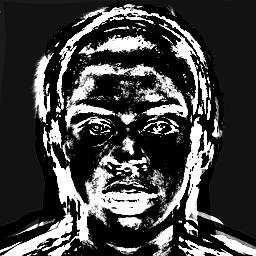
Iterating this process again for each faces of our starting database, we will get their position into the space of the faces and we can start the facial recognition process. The matrix of projection coefficients of all faces will be composed from all the values of ak,i where the k-th values and the i-th does match in our case and it is equal to 25.
Following the code needed to compute it:
// m1 : Image less face average matrix
// m2 : eigenVectors matrix
public static double[][] calculateProjectionCoefficients(double[][] m1, double[][] m2){

    int m1_col = m1[0].length;              // m1 columns length
    int m1_row = m1.length;                 // m1 row length
    int m2_col = m2[0].length;              // m2 columns length
    int m2_row = m2.length;                 // m2 row length

    double[][] coefficients = new double[m1_row][m2_row];
    double[] phi = new double[m1_col];
    double[] u = new double[m2_col];

    for (int i = 0; i < m1_row; i++) {
        for (int p = 0; p < m1_col; p++) {

            // temp value for phi[i]; each time one row is stored
            phi[p] = m1[i][p];
        }

        for(int j=0; j < m2_row; j++) {
            for(int k=0; k < m2_col; k++){

                // temp value for
                u[k] = m2[j][k];
            }
            coefficients[i][j] = productOfTwoArray(u, phi);
        }
    }

    coefficients = transposeMatrix(coefficients);
    return coefficients;
}
public static double[][] calculateEigenfacesProjection(double[][] m1, double[][] m2, double[][] coefficients){

    int m1_col = m1[0].length;              // m1 columns length
    int m1_row = m1.length;                 // m1 row length

    double[][] result = new double[m1_row][m1_col];
    result = productOfTwoMatrix(coefficients, m2);

    return result;
}
We can now add all the pieces written above together and finally get out our eigenfaces calculation process. Let's analyze the code:
- Eigenfaces : the constructor, it takes as input the context, the image size and an EigenfacesResultTask object to bring out the scope the final result that we will pass to the facial recognition function
- onPreExecute() : it just displays out when the process starts
- doInBackground : it computes the eigenfaces , saving them as pictures into the "Training_DB" folder and return through the EigenfacesResultTask interface the face average, the eigenvectors matrix and the projection coefficients matrix
- onPostExecute : it displays out a Toast whenever the database is successfully created or not
- saveToDatabase : this function simply transform the face's projection matrix into '.png' files
public class Eigenfaces extends AsyncTask <Context, Integer, Boolean> {

    private EigenfacesResultTask mCallback = null;
    private Database db = null;
    private int imageSize;
    private double M;
    ProgressDialog myProgress = null;
    private Context mContext;

    public Eigenfaces(Context _context, int imageSize, EigenfacesResultTask myEFRT) {

        mContext = _context;

        this.imageSize = imageSize;
        this.M = 25;                        // number of database images
        this.mCallback = myEFRT;
    }

    @Override
    protected void onPreExecute() {
        super.onPreExecute();

        CharSequence text = "Start Eigenfaces Computation Process";
        int duration = Toast.LENGTH_SHORT;

        Toast toast = Toast.makeText(mContext, text, duration);
        toast.setGravity(Gravity.BOTTOM| Gravity.CENTER, 0, 200);
        toast.show();
    }

    @Override
    protected Boolean doInBackground(Context... params) {

        List<double[]> s = new ArrayList<>();               // to store all the transposed images
        double[] face_average = null;                       // face average array
        double[][] s_less_face_average = null;              // image less face average matrix
        double[][] s_less_face_average_transpose = null;    // image less face average matrix transpose
        double[][] covarianceMatrix = null;                 // A^T * A
        double[][] eigenvectorsMatrix_temp = null;          // the eigenvectors matrix temp
        double[][] eigenvaluesMatrix_temp = null;           // the eigenvalues matrix
        double[][] eigenvectorsMatrix_transpose = null;     // the eigenvcetors matrix trasponse
        double[][] eigenvectorsMatrix = null;               // the eigenvectors matrix final
        double[][] projection_coefficients;                 // the matrix of project coefficients
        double[][] face_projection_matrix;                  // the face projection matrix

        String folder_path = Environment.getExternalStorageDirectory() + "/APP/DB_bw/";
        String image_path = null;
        File directory = new File(folder_path);
        File[] files = directory.listFiles();

        if (files != null) {
            for (int i = 0; i < files.length; i++) {
                image_path = folder_path + files[i].getName().toString();
                Bitmap image = Image.getImage(image_path);

                // transpose the image into a column vector
                double[] image_column = Image.getColumnVectorOfImage(image, 256 * 256);

                // create the set S
                s.add(image_column);
            }

            /** calculate average face */
            face_average = calculateFaceAverage(256, s, M);

            /** subtract face average to each image => A */
            s_less_face_average_transpose = subtractFaceAverageToAnImage(s , face_average);
            s_less_face_average = transposeMatrix(s_less_face_average_transpose);

            /** calculate covariance matrix => A x A^T */
            covarianceMatrix = productOfMatrixAndMatrixTranspose(s_less_face_average);

            /** calculate the eigenvcetors and eigenvalues of A x A^T */
            eigenvaluesMatrix_temp = getEigenvaluesMatrix(covarianceMatrix);
            eigenvectorsMatrix_temp = getEigenvectorsMatrix(covarianceMatrix);

            /** calculate Au */
            eigenvectorsMatrix_transpose = productOfTwoMatrix(s_less_face_average, eigenvectorsMatrix_temp);
            eigenvectorsMatrix = multiplyMatrixForANumber(transposeMatrix(eigenvectorsMatrix_transpose), 1/M);

            /** compute face projection */
            projection_coefficients = calculateProjectionCoefficients(transposeMatrix(s_less_face_average), eigenvectorsMatrix);
            face_projection_matrix = calculateEigenfacesProjection(transposeMatrix(s_less_face_average), eigenvectorsMatrix, projection_coefficients);

            // save it into db
            saveToDatabase(face_projection_matrix);

            mCallback.onTaskComplete(face_average, eigenvectorsMatrix, projection_coefficients);
            return true;
        }

        return false;
    }

    @Override
    protected void onProgressUpdate(Integer... values) {
        super.onProgressUpdate(values);
        myProgress.setProgress(values[0]);
    }

    @Override
    protected void onPostExecute(Boolean result) {
        super.onPostExecute(result);

        if(result==true) {
            CharSequence text = "Database Succesfull Created";
            int duration = Toast.LENGTH_SHORT;

            Toast toast = Toast.makeText(mContext, text, duration);
            toast.setGravity(Gravity.BOTTOM | Gravity.CENTER, 0, 200);
            toast.show();
        }
        else
        {
            CharSequence text = "Database Not Created";
            int duration = Toast.LENGTH_SHORT;

            Toast toast = Toast.makeText(mContext, text, duration);
            toast.setGravity(Gravity.BOTTOM | Gravity.CENTER, 0, 200);
            toast.show();
        }
    }


    private static void saveToDatabase(double[][] matrixOfImages) {
        Bitmap face_projection = null;
        Database db = null;
        db = new Database();

        double[] column = new double[matrixOfImages[0].length]; // Here I assume a rectangular 2D array!
        int index = matrixOfImages.length;

        int[] column_final = new int[column.length];

        for (int i = 0; i < index; i++) {

            for (int j = 0; j < column.length; j++) {
                column[j] = matrixOfImages[i][j];
            }

            double max_value = getMaxArrayValue(column);
            double min_value = getMinArrayValue(column);

            double scalar_coefficient = 255 / max_value;

            for (int k = 0; k < column.length; k++) {
                column[k] = column[k];
                column[k] = scalar_coefficient * column[k];
            }

            // cast the Array to int Array
            for (int m = 0; m < column_final.length; m++) {

                int color = ((int) column[m] & 0xff) << 24 |
                        ((int) column[m] & 0xff) << 16 |
                        ((int) column[m] & 0xff) << 8 |
                        ((int) column[m] & 0xff);

                column_final[m] = color;
            }

            face_projection = Bitmap.createBitmap(column_final, 256, 256, Bitmap.Config.ARGB_8888);
            db.createTrainingDatabase(face_projection, i);
        }
    }
}
Facial Recognition Class and Task
To understand if a new subject is present in the initial database, we have to consider its projection in the new space and calculate the distance compared to the other faces. If the value is close enough to one of the them, the recognition is made. Let's have a look to the process.
First of all we must choose an arbitrary threshold value: all the values below this one will be consider "close" enough to the new space and the image will be recognized as present in the database.
To choose the threshold properly we have to set our final goal; mostly common objectives are:
- Recognize a face in the initial database
- Recognize if a face is present or not in the database
For this project we have chosen to recognize if a face is present or not in our database.
Let's consider a new image 256 x 256 pixels (from now on we will call it Δ) which has the same starting conditions of our database; at this point we project Δ into eigenfaces space.
δk = ukT (Δ - Ψ)
(where k goes from 1 to 25)
In this way we have subtracted the face average Ψ to Δ and we have also calculated the projection coefficients; this gives us the new coordinates of Δ - Ψ into the new space. Let's call Ω the column vector that describes each eigenfaces weight for Δ :
ΩΔ = (δ1, δ2, ..., δ25)
It is now possible to calculate the distance between Δ and the eigenfaces space. We can call ΩΦjT the row vector of projection coefficients of Φj, the j-th image deprived of the face average. Let's consider the Euclidean's distance between the projection of Δ - Ψ and Φj
εj2 = ||ΩΔ - ΩΦj ||2
Let's calculate the distance compared to each faces of the starting database.
ε = min (εj2)
(where the min is calculate from 1 to 25)
At this point there can be two possible outcome:
1. ε > Θ
2. ε < Θ
(1) In this case we have that the Euclidean's distance between the new face's projection and anyone other face of the starting database projected into the eigenfaces space is bigger than the threshold value. That means the new face isn't recognized as present into the database
(2) In this case the facial recognition is achieved. The distance, infact, is less or equal to threshold value and that point out that the subject has been recognized.
Let's analyze the code:
public class FacialRecognition extends AsyncTask<Context, Integer, Boolean> {

    private FacialRecognitionResultTask mCallback = null;
    private Database db ;

    ProgressDialog myProgress = null;
    private Context mContext;
    private double threshold_min = 0;
    private double threshold_max;
    private boolean flag = false;
    private Bitmap input_pic;
    private Bitmap input_pic_bw;
    private Bitmap input_pic_bw_resized;
    private int M;
    private double epsilon;
    private double min_epsilon_temp;
    private double min_epsilon = Double.MAX_VALUE;
    private double[][] epsilon_squared;
    private double[] face_average;
    private double[] image_less_face_average;
    private double[][] eigenvectors_matrix;
    private double[] projection_coefficients;
    private double[][] projection_coefficients_db;

    public FacialRecognition(Context _context, Bitmap pic, Database db, double[] faceAverage, double[][] eigenvectorsMatrix,
                             double[][] projectionCoefficientsDB, double numberOfPics, double thresholdValue,
                             FacialRecognitionResultTask myFRRT)
    {

        mContext = _context;

        //this.mCallback = myFCRT;
        this.M = (int)numberOfPics;
        this.db = db;
        this.input_pic = pic;
        this.face_average = faceAverage;
        this.eigenvectors_matrix = eigenvectorsMatrix;
        this.threshold_max = thresholdValue;
        this.projection_coefficients_db = projectionCoefficientsDB;

        /* myProgress = new ProgressDialog(context);
        myProgress.setTitle("Processing Data");
        myProgress.setMessage("Please wait...");
        myProgress.setMax(100);
        myProgress.setIndeterminate(false); */
    }


    @Override
    protected void onPreExecute() {
        super.onPreExecute();

        CharSequence text = "Start Facial Recognition Process";
        int duration = Toast.LENGTH_SHORT;

        Toast toast = Toast.makeText(mContext, text, duration);
        toast.setGravity(Gravity.BOTTOM| Gravity.CENTER, 0, 200);
        toast.show();
    }

    @Override
    protected Boolean doInBackground(Context... params) {

        projection_coefficients = new double[M];

        String folder_path = Environment.getExternalStorageDirectory() + "/APP/TestImage/";
        String filename = null;
        File directory = new File(folder_path);

        for (File f : directory.listFiles()) {
            if (f.isFile())
                filename = f.getName();
        }

        if(threshold_max == 0){
            flag = true;
            return false;
        }

        // transpose the image into a column vector (delta)

        if ("check_image.jpg".equals(filename)) {
            input_pic = Image.rotateImage(input_pic, 270);
        }
        input_pic_bw = Image.createGrayScale(input_pic);
        input_pic_bw_resized = Image.resizeImage(input_pic_bw);
        double[] image_column = Image.getColumnVectorOfImage(input_pic_bw_resized, 256 * 256);
        image_less_face_average = new double[image_column.length];

        // subtract the face average to the image
        for (int i = 0; i < image_column.length; i++) {
            image_less_face_average[i] = image_column[i] - face_average[i];
        }

        /**double[][] m1 = convertSingleArrayTo2DMatrix(image_less_face_average, 256);
        double[][] m2 = (transposeMatrix(eigenvectors_matrix));
        projection_coefficients = productOfTwoMatrix(m1, m2);
        **/

        for(int i=0; i < M; i++)
        {
            projection_coefficients[i] = productOfTwoArray(eigenvectors_matrix[i] ,image_less_face_average);
        }

        epsilon_squared = new double[M][M];

        for(int k=0; k < M; k++)
        {
            epsilon_squared[k] =  calculateEuclideanDistance(projection_coefficients, projection_coefficients_db[k]);
            min_epsilon_temp = getMinArrayValue(epsilon_squared[k]);

            if(min_epsilon_temp < min_epsilon)
                min_epsilon = min_epsilon_temp;

        }

        //epsilon = checkValue(min_epsilon);
        epsilon = min_epsilon * Math.pow(10, 20);

        if (epsilon > threshold_min && epsilon < threshold_max)
            return true;
        else
            return false;
    }

    @Override
    protected void onProgressUpdate(Integer... values) {
        super.onProgressUpdate(values);
        myProgress.setProgress(values[0]);
    }

    @Override
    protected void onPostExecute(Boolean result) {
        super.onPostExecute(result);

        if(result==true) {
            CharSequence text = "Your face match with the db. UNLOCK!\n" + "\t\t\t\t\t\t\t\t\t\t Epsilon: " + (int)epsilon;
            int duration = Toast.LENGTH_SHORT;

            Toast toast = Toast.makeText(mContext, text, duration);
            toast.setGravity(Gravity.BOTTOM | Gravity.CENTER, 0, 200);
            toast.show();
        }
        else
        {
            if (flag == true) {
                CharSequence text = "Please select a valid SeekBar Value";
                int duration = Toast.LENGTH_SHORT;

                Toast toast = Toast.makeText(mContext, text, duration);
                toast.setGravity(Gravity.BOTTOM | Gravity.CENTER, 0, 200);
                toast.show();
            }
            else{

                CharSequence text = "Your face doesn't match with the db. Still LOCK. Try again.\n" + "\t\t\t\t\t\t\t\t\t\t Epsilon: " + (int)epsilon;
                int duration = Toast.LENGTH_SHORT;

                Toast toast = Toast.makeText(mContext, text, duration);
                toast.setGravity(Gravity.BOTTOM | Gravity.CENTER, 0, 200);
                toast.show();
            }
        }

    }
}
public static double[] calculateEuclideanDistance(double[] a1, double[] a2){

    double[] aResult = new double[a1.length];

    for (int i = 0 ; i < a1.length ; i++)
    {
        aResult[i] = Math.pow(Math.abs(a1[i] - a2[i]), 2);
    }

    return aResult;
}
Camera Task
In order to capture a picture from our backfront camera, we are gonna use CAMERA 2 API .
It's important to notice that this API will only work with minSdkVersion: 21 or above; open the build.gradle file to check your currente version. First of all, we need to add the missing permission in the manifest adding this line of code:
<uses-permission android:name="android.permission.CAMERA"/>
<uses-permission android:name="android.hardware.camera2.full"/>
Then we add TextureView that it will manage the real time camera preview.
<TextureView
    android:id="@+id/textureView"
    android:layout_width="match_parent"
    android:layout_height="match_parent"
    android:layout_above="@+id/..."/>
Finally in order to gain some more space, we remove the top ActionBar by modifying the styles.xml file (res -> values)
<resources>

    <!-- Base application theme. -->
    <style name="AppTheme" parent="Theme.AppCompat.Light.NoActionBar">
        <!-- Customize your theme here. -->
        <item name="colorPrimary">@color/colorPrimary</item>
        <item name="colorPrimaryDark">@color/colorPrimaryDark</item>
        <item name="colorAccent">@color/colorAccent</item>
    </style>

</resources>
Finally we can add the code on the main of our application :
private TextureView textureView;

// Check state orientation of output image
private static final SparseIntArray ORIENTATIONS = new SparseIntArray();
static {
   ORIENTATIONS.append(Surface.ROTATION_0, 90);
   ORIENTATIONS.append(Surface.ROTATION_90, 0);
   ORIENTATIONS.append(Surface.ROTATION_180, 270);
   ORIENTATIONS.append(Surface.ROTATION_270, 180);
}

private String cameraId;
private CameraDevice cameraDevice;
private CameraCaptureSession cameraCaptureSessions;
private CaptureRequest.Builder captureRequestBuilder;
private Size imageDimension;

private ImageReader imageReader;

//Save to FILE
private File file;
private static final int REQUEST_CAMERA_PERMISSION = 200;
private boolean mFlashSupported;
private Handler mBackgroundHandler;
private HandlerThread mBackgroundThread;

CameraDevice.StateCallback stateCallBack = new CameraDevice.StateCallback() {
   @Override
   public void onOpened(@NonNull CameraDevice camera) {
       cameraDevice = camera;
       createCameraPreview();
   }

   @Override
   public void onDisconnected(@NonNull CameraDevice camera) {
       cameraDevice.close();
   }

   @Override
   public void onError(@NonNull CameraDevice camera, int error) {
       cameraDevice.close();
       cameraDevice = null;
   }
};

@Override
protected void onCreate(Bundle savedInstanceState) {
   super.onCreate(savedInstanceState);
   setContentView(R.layout.activity_main);

   initViews();
   initListeners();

   assert textureView != null;
   textureView.setSurfaceTextureListener(textureListener);
}


/**
 * This method is to initialize views
 */
private void initViews() {

   textureView = (TextureView)findViewById(R.id.textureView);
   btn_Training = (Button) findViewById(R.id.btn_training);
}

/**
 * This method is to initialize listeners
 */
private void initListeners() {

    btn_Take_Picture.setOnClickListener(new View.OnClickListener() {
        @Override
        public void onClick(View view) {

            takePicture();
        }
    });
}


private void takePicture() {

   if(cameraDevice == null)
       return;
   CameraManager manager = (CameraManager)getSystemService(Context.CAMERA_SERVICE);
   try{

       CameraCharacteristics characteristics = manager.getCameraCharacteristics(cameraDevice.getId());
       Size[] jpegSizes = null;
       if(characteristics != null)
           jpegSizes = characteristics.get(CameraCharacteristics.SCALER_STREAM_CONFIGURATION_MAP)
                   .getOutputSizes(ImageFormat.JPEG);

       // Capture image with custom size
       int width = 640;
       int height = 480;

       if(jpegSizes != null && jpegSizes.length > 0)
       {
           width = jpegSizes[0].getWidth();
           height = jpegSizes[0].getHeight();
       }

       ImageReader reader = ImageReader.newInstance(width, height, ImageFormat.JPEG, 1);
       List<Surface> outputSurface = new ArrayList<>(2);
       outputSurface.add(reader.getSurface());
       outputSurface.add(new Surface(textureView.getSurfaceTexture()));

       final CaptureRequest.Builder captureBuilder = cameraDevice.createCaptureRequest(CameraDevice.TEMPLATE_STILL_CAPTURE);
       captureBuilder.addTarget(reader.getSurface());
       captureBuilder.set(CaptureRequest.CONTROL_MODE, CameraMetadata.CONTROL_MODE_AUTO);

       // Check orientation base on device
       int rotation = characteristics.get(CameraCharacteristics.SENSOR_ORIENTATION);
       captureBuilder.set(CaptureRequest.JPEG_ORIENTATION, rotation);

       // save the image
       dir = new File(Environment.getExternalStorageDirectory()+ "/APP/TestImage/");
       dir.mkdirs();
       file = new File(Environment.getExternalStorageDirectory()+ "/APP/TestImage/check_image.jpg");
       ImageReader.OnImageAvailableListener readListener = new ImageReader.OnImageAvailableListener() {
           @Override
           public void onImageAvailable(ImageReader reader) {
               Image image = null;

               try{
                   image = reader.acquireLatestImage();
                   ByteBuffer buffer = image.getPlanes()[0].getBuffer();
                   byte[] bytes = new byte[buffer.capacity()];
                   buffer.get(bytes);
                   save(bytes);
               }
               catch (FileNotFoundException e){
                   e.printStackTrace();
               }
               catch (IOException e){
                   e.printStackTrace();
               }
               finally {
                   {
                       if(image != null)
                           image.close();
                   }
               }
           }

           private void save(byte[] bytes) throws IOException {

               OutputStream outputStream = null;
               try {
                   outputStream = new FileOutputStream(file);
                   outputStream.write(bytes);
               }finally {
                   if(outputStream != null)
                       outputStream.close();
               }
           }

       };

       reader.setOnImageAvailableListener(readListener, mBackgroundHandler);

       final CameraCaptureSession.CaptureCallback captureListener = new CameraCaptureSession.CaptureCallback() {
           @Override
           public void onCaptureCompleted(@NonNull CameraCaptureSession session, @NonNull CaptureRequest request, @NonNull TotalCaptureResult result) {
               super.onCaptureCompleted(session, request, result);
               Toast.makeText(MainActivity.this,"Saved " + file,Toast.LENGTH_SHORT).show();
               createCameraPreview();
           }
       };

       cameraDevice.createCaptureSession(outputSurface, new CameraCaptureSession.StateCallback() {
           @Override
           public void onConfigured(@NonNull CameraCaptureSession session) {
               try {
                   session.capture(captureBuilder.build(), captureListener,mBackgroundHandler);
               } catch (CameraAccessException e) {
                   e.printStackTrace();
               }
           }

           @Override
           public void onConfigureFailed(@NonNull CameraCaptureSession session) {

           }
       },mBackgroundHandler);

   }catch (CameraAccessException e) {
       e.printStackTrace();
   }
}

private void createCameraPreview() {

   try{
       SurfaceTexture texture = textureView.getSurfaceTexture();
       assert  texture != null;
       texture.setDefaultBufferSize(imageDimension.getWidth(), imageDimension.getHeight());
       Surface surface = new Surface(texture);
       captureRequestBuilder = cameraDevice.createCaptureRequest(CameraDevice.TEMPLATE_PREVIEW);
       captureRequestBuilder.addTarget(surface);
       cameraDevice.createCaptureSession(Arrays.asList(surface), new CameraCaptureSession.StateCallback() {
           @Override
           public void onConfigured(@NonNull CameraCaptureSession session) {
               if(cameraDevice == null)
                   return;
               cameraCaptureSessions = session;
               updatePreview();
           }

           @Override
           public void onConfigureFailed(@NonNull CameraCaptureSession session) {
               Toast.makeText(MainActivity.this, "Changed", Toast.LENGTH_SHORT).show();
           }
       },null);

   } catch (CameraAccessException e) {
       e.printStackTrace();
   }
}

private void updatePreview() {
   if(cameraDevice == null)
       Toast.makeText(this, "Error", Toast.LENGTH_SHORT).show();
   captureRequestBuilder.set(CaptureRequest.CONTROL_MODE, CaptureRequest.CONTROL_MODE_AUTO);
   try{
       cameraCaptureSessions.setRepeatingRequest(captureRequestBuilder.build(), null, mBackgroundHandler);
   } catch (CameraAccessException e) {
       e.printStackTrace();
   }
}

private void openCamera() {

   CameraManager manager = (CameraManager)getSystemService(Context.CAMERA_SERVICE);
   try {

       // change [0] = FRONT_CAMERA or [1] = BACK CAMERA
       cameraId = manager.getCameraIdList()[1];
       CameraCharacteristics characteristics = manager.getCameraCharacteristics(cameraId);
       StreamConfigurationMap map = characteristics.get(CameraCharacteristics.SCALER_STREAM_CONFIGURATION_MAP);
       assert map != null;
       imageDimension = map.getOutputSizes(SurfaceTexture.class)[0];

       // Check realtime permission if run higher API 23
       if(ActivityCompat.checkSelfPermission(this, Manifest.permission.CAMERA) != PackageManager.PERMISSION_GRANTED)
       {
           ActivityCompat.requestPermissions(this, new String[]{
                   Manifest.permission.CAMERA,
                   Manifest.permission.WRITE_EXTERNAL_STORAGE
           }, REQUEST_CAMERA_PERMISSION);
           return;
       }

       manager.openCamera(cameraId, stateCallBack, null );

   } catch (CameraAccessException e) {
       e.printStackTrace();
   }

}


TextureView.SurfaceTextureListener textureListener = new TextureView.SurfaceTextureListener() {
   @Override
   public void onSurfaceTextureAvailable(SurfaceTexture surface, int width, int height) {
       openCamera();
   }

   @Override
   public void onSurfaceTextureSizeChanged(SurfaceTexture surface, int width, int height) {

   }

   @Override
   public boolean onSurfaceTextureDestroyed(SurfaceTexture surface) {
       return false;
   }

   @Override
   public void onSurfaceTextureUpdated(SurfaceTexture surface) {

   }
};

// Ctrl + O

@Override
public void onRequestPermissionsResult(int requestCode, @NonNull String[] permissions, @NonNull int[] grantResults) {
   if(requestCode == REQUEST_CAMERA_PERMISSION)
   {
       if(grantResults[0] != PackageManager.PERMISSION_GRANTED)
       {
           Toast.makeText(this, " You can't use camera without permission", Toast.LENGTH_SHORT).show();
           finish();
       }
   }
}

@Override
protected void onResume() {
   super.onResume();
   startBackgroundThead();
   if(textureView.isAvailable())
       openCamera();
   else
       textureView.setSurfaceTextureListener(textureListener);
}

@Override
protected void onPause() {
   stopBackgroundThread();
   super.onPause();
}

private void stopBackgroundThread() {
   mBackgroundThread.quitSafely();
   try {
       mBackgroundThread.join();
       mBackgroundThread = null;
       mBackgroundHandler = null;

   } catch (InterruptedException e) {
       e.printStackTrace();
   }
}

private void startBackgroundThead() {
   mBackgroundThread = new HandlerThread("Camera Background");
   mBackgroundThread.start();
   mBackgroundHandler = new Handler(mBackgroundThread.getLooper());
}